Project Configuration
Dragonfly project configuration properties reference.
Overview
Dragonfly configuration is set per ReadyAPI project using project-level custom properties. Initialize properties by right-clicking your project and selecting "Dragonfly: (Un)Initialize project".
Properties like QC_TestPlanDirectory, QC_TestLabDirectory, and QC_TestSet can also be set at the test suite level. Suite-level values take precedence over project-level values — useful when mapping each suite to a different TestPlan/TestLab location.
Configuration Properties
| Property | Required | Description | Sample Value |
|---|---|---|---|
QC_URL | Yes | HP ALM URL. Must end with /qcbin | http://alm.example.com:8080/qcbin |
QC_Domain | Yes | HP ALM domain name | DEFAULT |
QC_Project | Yes | HP ALM project name | demo-project |
QC_user | Yes | HP ALM username with TestPlan/TestLab permissions | jsmith |
QC_password | Yes | HP ALM password (encrypted and masked automatically) | |
QC_TestPlanDirectory | Yes | ALM Test Plan path. Created automatically if it doesn't exist. | Subject\testplan01 |
QC_TestLabDirectory | Yes | ALM Test Lab path. Results saved here. Created if it doesn't exist. | Root\testlab01 |
QC_TestSet | Yes | ALM test set name. Created if it doesn't exist. | myTestSet01 |
QC_soapUI_ARGS | No | Extra testrunner.bat arguments for CI or ALM-launched runs | "-j" "-fC:\Reports" |
QC_BulkUpdate | No | Batch all status updates at end of run for speed. | enabled / disabled |
QC_RunName | No | Override the default run name (default: Run: <timestamp> syncing complete) | release-1.6-run |
QC_ProjectPath | No | ReadyAPI project path on ALM host machines. Use when running tests from ALM on remote hosts. | C:\ReadyAPI-projects\ |
QC_soapUIPath | No | Path to testrunner.bat on ALM hosts (if ReadyAPI is not in the default location) | D:\ReadyAPI\bin\testrunner.bat |
QC_Export_Disabled_Tests | No | Export disabled tests to ALM as well | enabled / disabled |
QC_Dragonfly_Plugin | No | Enable or disable the plugin globally | enabled / disabled |
QC_Override_Test_Runs | No | Remove all previous runs so each test has only one run | enabled / disabled |
Custom User Fields
Many ALM setups define custom user fields on Test, TestSet, and Run entities. Dragonfly provides a configuration wizard to map these fields.
ALM Custom Fields Example
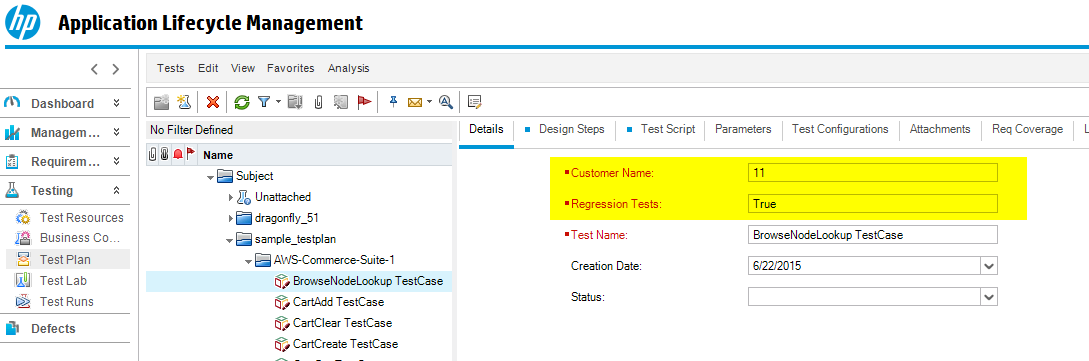
Opening the Custom Fields Wizard
If an ALM project has required user properties that have not been mapped in the wizard, you will see errors in the Dragonfly log during most operations.

Right-click your project and select Dragonfly: Configure Custom Fields to open the wizard:
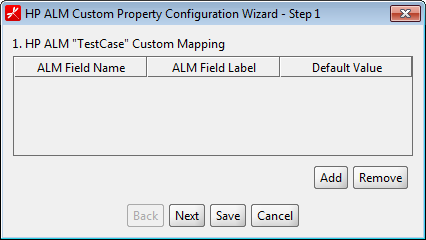
The wizard lets you configure Test, TestSet, and Run entities. Specify the ALM Field Name, Label, and default value for each, then click Save:
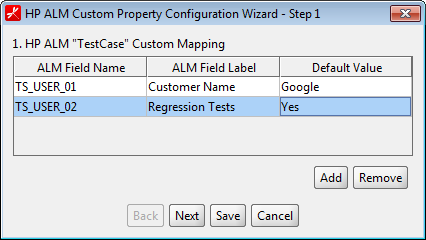
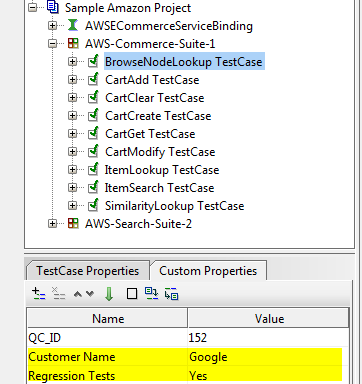
Once saved, default values are added to the ReadyAPI project:
- Test → ReadyAPI TestCase custom property
- TestSet → ReadyAPI project and test suite custom property
- Run → ReadyAPI TestCase custom property
Copying Configuration to Other Projects
To reuse the same custom field mapping across multiple ReadyAPI projects:
- Right-click any project → Dragonfly: Configure Custom Fields
- Select Menu → Copy from project
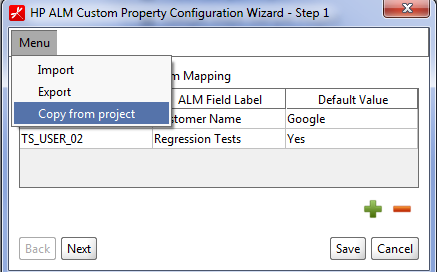
- Select the source project and click OK
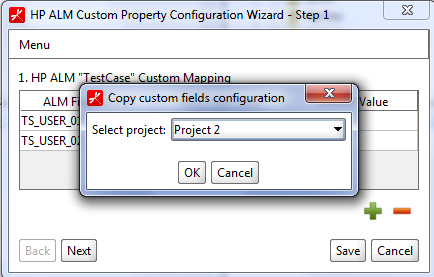
- Click Save to apply
Import/Export Configuration
Custom field configuration can be exported to a file and shared with colleagues:
- Export: Right-click project → Configure Custom Fields → Menu → Export → enter filename
- Import: Right-click project → Configure Custom Fields → Menu → Import → select file → click Save